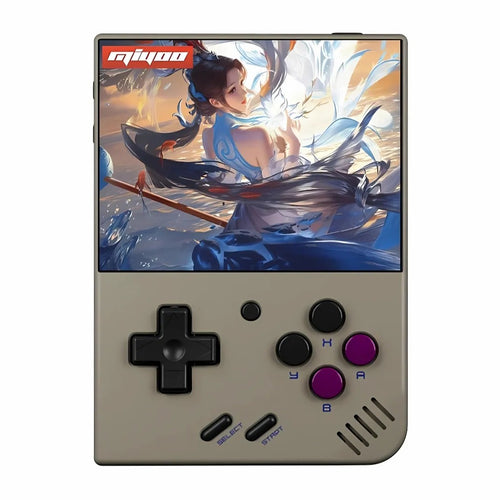
The Miyoo console is a family of retro handhelds centred on simplicity, portability and excellent value for money. Hugely popular with retro gaming fans, Miyoo consoles bank on a pocket format, precise controls and a community ecosystem (alternative firmwares, themes, tutorials) that makes getting started easy and improves the experience over time.
Flagship Miyoo models
- Miyoo Mini — Ultra-compact format (~2.8" screen) designed to play anywhere. Perfect for 8/16/32-bit and PS1.
- Miyoo Mini Plus — A more comfortable ~3.5" format, often with Wi-Fi depending on the revision: ideal for the same targets (8/16/32-bit + PS1) with better viewing comfort.
Worth remembering: the Miyoo range focuses on retro 2D/PS1. There are no analogue sticks: this is not the console for heavier 3D (N64/Dreamcast/PSP).
Technical features & compatibility
- IPS screen, sharp and bright (2.8" on the Mini, ~3.5" on the Mini Plus) with a resolution suited to retro.
- Controls: precise D-pad, ABXY buttons, triggers — without analogue sticks.
- System: a Linux base optimised for emulation. Broad support for modern frontends.
- Connectivity: Wi-Fi (on the Mini Plus depending on revision), useful for scraping box art and for updates.
- Storage: microSD for the system and your libraries. Easy to expand/replace.
- Compatibility: excellent on NES, SNES, Mega Drive, PC-Engine, Neo-Geo, GB/GBC/GBA, PS1. Beyond that (N64/Dreamcast/PSP): not recommended on Miyoo.
Pros & cons
Pros
- Pocket format and featherweight — it slips in anywhere.
- Ease of use for 2D and PS1: you get playing quickly and comfortably.
- Value for money that is very competitive.
- Active community: alternative firmwares, themes, guides (easy updating and customisation).
Cons
- No analogue sticks → modern 3D games and certain systems are not suitable.
- Limited power → aimed at retro up to PS1, not beyond.
- Stock interface sometimes basic → hence the appeal of alternative firmwares.
Miyoo vs other retro consoles
- Against larger “ready to play” Linux consoles: Miyoo is more portable, but less versatile (no heavy 3D).
- Against Android consoles: those handle 3D systems better (PSP/Dreamcast/N64), but are more expensive and bulkier. Miyoo remains unbeatable for 2D/PS1 in your pocket.
- Against Windows consoles: no comparison in power… or in price/weight. Miyoo targets simplicity and pure retro.
User guide: getting started
- Prepare a reliable microSD (U3 class recommended). Always back up your data.
- Update the firmware (official or alternative) and follow a step-by-step installation guide.
- Add your games legally (personal backups). Avoid dubious packs and prefer a clear organisation by system.
- Scrape the box art over Wi-Fi (if available) or with a PC tool for a clean display per console.
- Fine-tune the options: button mapping, simple shaders, 4:3/full-screen ratio, save states.
- Power: lower the brightness and enable auto sleep to extend battery life.
Which Miyoo should you choose?
- You want the most compact option: the Miyoo Mini (truly pocketable, quick sessions).
- You prioritise screen comfort: Miyoo Mini Plus (~3.5", better visibility, often with Wi-Fi).
- Main use: retro 2D (8/16/32-bit) + PS1. For PSP/Dreamcast/N64, go for a more powerful Android console.
Where to buy a Miyoo, and at what price?
Favour reliable European retailers to benefit from secure payment, clear VAT and warranty terms, as well as fast shipping. Expect a price range running from entry level to an affordable mid-range (prices fluctuate with demand, storage capacity and editions).
❓ Miyoo FAQ
🎯 Who is the Miyoo console for?
For anyone who wants a pocket format, simple and effective, to enjoy 8/16/32-bit classics and the PS1 without complex settings.
🧩 Which games, and how do you install them?
Miyoo consoles read roms from retro consoles (NES, SNES, Mega Drive, GBA, PS1…). Copy your legally obtained backups onto the microSD card, then refresh your library in the frontend of your choice.
⚖️ Strengths and limits?
+ : ultra-portable format, simplicity, price, community. – : no analogue sticks, no heavy 3D, basic stock interface (alternative firmwares improve the experience).
🛠️ Tips for getting started?
Use a quality microSD card (U3), update the firmware, scrape the box art, adjust brightness/aspect ratio/button mapping, and enable save states & auto sleep.
🛒 Where can you buy the Miyoo Mini Plus?
See the product page: Miyoo Mini Plus — the ultimate retro gaming experience