About Ayn
Ayn Consoles (AYN inc .) are among the leading Android devices for portable gaming: They combine performance, screen quality ( panel / screen ) and precise ABXY controls. Ideal for cloud gaming , Play Store games ( APK ), and advanced emulation, with a community known for its guides and customer reviews . Whether you're a beginner or looking for a powerful and "at" machine " Easy to use " on a daily basis, the range covers the essential uses.
Ayn in brief
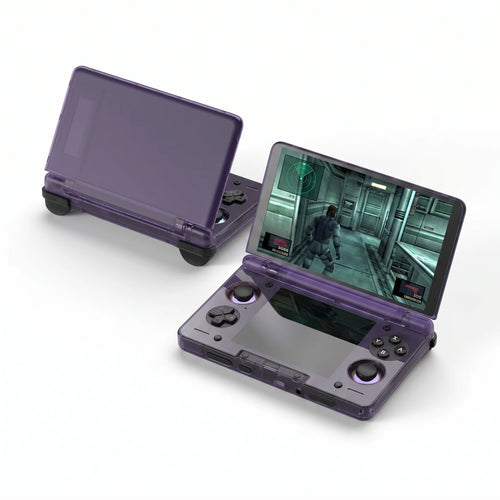
The Ayn family made its mark with Odin , then established itself with Odin 2 (Snapdragon 8 Gen 2 — High-performance CPU / SoC ). In 2025, the catalog includes Odin 2 Mini (5" format), Odin 2 Portal (7" OLED, 120 Hz) and Thor ( dual-screen clamshell). A Loki (Windows) lineage also existed on the Ayn side for PC libraries.
Flagship models and for whom?
- Odin (Lite / Base / Pro) — Android: excellent base for emulation up to PS2/GameCube (depending on games and settings).
- Odin 2 — 6", Android 13, Snapdragon 8 Gen 2: versatile, perfect for cloud and mobile gaming.
- Odin 2 Mini — 5" MiniLED: ultra-portable, ideal for on-the-go use while still having power reserve.
- Odin 2 Portal — OLED 7" 120 Hz: visual immersion, long sessions, great in the living room via dock/monitor.
- Thor — Dual-screen clamshell format: mobility and multi-use (streams, chat/Discord, Android games).
- Loki (Windows) — Native access to PC games (launchers), a Windows alternative “ at Ayn’s”.
Tip: For a "home console" feel, use a video dock and play on a monitor /TV with an Xbox controller.
New products from Ayn
- Odin 2 Portal — large OLED 7", Wi-Fi up to 7, precise ABXY controls ( Xbox -type orientation).
- Odin 2 Mini — 5" format: perfect for everyday use and Android games .
- Thor — Dual-screen clamshell: convenient on the go, Discord/ chat + game at the same time.
What makes the difference
- Display : IPS/MiniLED/OLED depending on model, smooth rendering up to 120 Hz (Portal).
- Controls : Hall sticks, analog triggers, ABXY / BAYX buttons (a nod to “ Joycon ” for those who are used to it).
- Systems : Android 13 (flexibility APK /stores) and Windows options (Loki).
- Connectivity : Wi-Fi/BT, easy connection to services (Xbox, Playstation Remote, Discord).
- Battery life : generous batteries for long sessions without compromise.
Compatibility & performance
Native Android : Play Store games, APK installation, quick optimizations. Cloud & Remote : Xbox Cloud, PS Remote Play, Steam Link, Moonlight (take your PC/console games ). Emulation : from 8/16/32-bit to PS1/PSP/Dreamcast/N64, with PS2/GameCube/Wii possibilities on Odin 2/Portal (depending on titles/settings).
Ayn Accessories & Controllers
To optimize the experience: hard case , screen protector , fast microSD cards, Video docks , grips /cases, and BT/USB controllers ( ABXY layout, Xbox type) in order to play in table/TV mode with controlled latency.
Advantages & disadvantages
Benefits
- High performance ( CPU / Snapdragon SoC ), superb screen (OLED possible).
- Android versatility: APK , emulators, cloud/remote.
- Precise controls ( ABXY , Hall sticks), good ergonomics, comfortable to use.
Disadvantages
- Settings required for certain demanding systems (PS2/GC/Wii).
- Larger Portal format: to be evaluated according to your hands/uses.
How to choose your Ayn?
- Format & use : 5" ultra-portable (Odin 2 Mini) / 6" balanced (Odin 2) / OLED 7" immersion (Odin 2 Portal).
- Target games : Native Android + cloud gaming / advanced emulation (check ABXY / BAYX , “ joycon -like” if needed).
- Display : IPS/MiniLED vs OLED (deep blacks, 120 Hz on Portal).
- Ecosystem : Xbox / PlayStation services, Discord , dock/monitor connection .
Why choose Ayn?
Compared to Windows laptops (ROG Ally , MSI Claw, AYANEO/ AYA ), Ayn stands out because of its Android simplicity, its battery life, and its power-to-size ratio. An excellent choice if you want a “daily driver” to play, test settings and enjoy a smooth mobile experience.
Quick recap (recommended use)
- Compact & portable → Odin 2 Mini
- Performance/format balance → Odin 2
- Immersion & lounge → Odin 2 Portal
Need personalized advice or compatible accessories? Discover our Ayn selection, shipped in Express , and find the console best suited to your needs.
✅ Product sheet: Ayn Odin 2 Portal – Fun-Esports
✅ The entire Ayn collection: Ayn Consoles – Fun-Esports
❓ Ayn FAQ
🎯 Which Ayn console should you choose?
Choose according to your needs:
- Compact & portable → Odin 2 Mini (5" format), Android, perfect for playing anywhere.
- Performance/format balance → Odin 2 (6", Snapdragon 8 Gen 2 CPU/SoC , excellent natively & in the cloud).
- Immersion & living room → Odin 2 Portal (OLED 7" 120 Hz, large panel/screen ).
- Clamshell & multi-purpose format → Thor (dual-screen, practical for Discord/ chat + game).
See the full range: Ayn Consoles – Fun-Esports .
🎮 Which games & systems are compatible?
- Native Android : Play Store games and APKs (action, indie, racing…).
- Cloud & Remote : Xbox Cloud Gaming, PS Remote Play ( playstation ), Steam Link, Moonlight (your PC/console games on the move).
- Emulation : 8/16/32-bit up to PS1/PSP/Dreamcast/N64, with PS2/GameCube/Wii support via Odin 2/Portal (depending on games/settings). Legally use your own game saves.
🧩 What is the difference between Odin 2, Odin 2 Mini, Odin 2 Portal and Thor?
- Odin 2 Mini : 5" MiniLED, ultra-portable.
- Odin 2 : 6" 1080p, versatile for everyday use.
- Odin 2 Portal : OLED 7" 120 Hz, premium visual experience.
- Thor : dual-screen clamshell phone, mixed use (gaming + apps/communication).
The four rely on Android, Hall sticks and precise ABXY buttons (orientation close to Xbox ).
📺 Can I play on TV/monitor?
Yes. With the compatible Super Dock , you can output the image to a monitor /TV, connect a keyboard/mouse or controllers, and enjoy a “living room console” mode.
☁️ Does cloud gaming work well?
Yes. On recent Ayn consoles (Odin 2 / Portal / Mini), Xbox Cloud Gaming and Remote Play are very smooth if your Wi-Fi is stable (preferably 5 GHz/6 GHz) and the speed/latency is good.
🔋 Battery life & charging: what can I expect?
- Odin 2 / Portal : large batteries for long sessions.
- Reduce brightness, limit 120Hz when unnecessary, close background apps to save battery life.
- Use a quality USB-C charger and a certified cable.
💾 Storage: microSD or internal?
Android handles APKs /data very well on a fast microSD card (U3 recommended). Keep the internal storage for apps, and the microSD card for libraries/ROMs and media.
🎯 Button Commands & Mapping
The Ayn controllers feature Hall effect sticks and ABXY buttons. You can map the controls (including BAYX ) and create combos to suit your preferences. Remember to test the stick/trigger sensitivity in the settings.
🔄 APK Updates & Installation
- Apply system updates/manufacturer settings before playing.
- For APKs , use trusted sources and allow installation from unknown sources with caution.
- Enable cloud backups if available.
🛒 Where to buy an Ayn console on Fun-Esports?
Directly from our shop:
- ✅ Product sheet: Ayn Odin 2 Portal – Fun-Esports
- ✅ The entire collection: Ayn Consoles – Fun-Esports