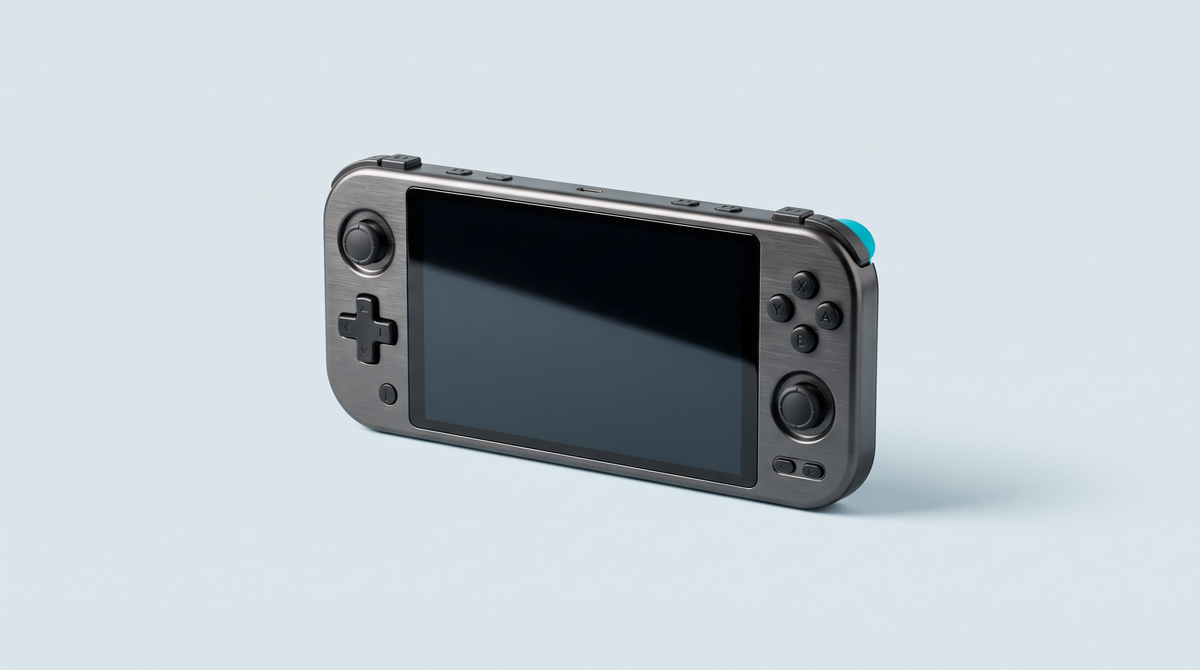
Anbernic RG557: the Android handheld that puts AMOLED to work for retro (and more)
🔎 Want to get straight to the point? See the live price and the full product page: Anbernic RG557.
1) In 30 seconds
- 5.48” Full HD AMOLED screen (1920×1080) with full OCA lamination: high contrast, vibrant colours, outstanding responsiveness.
- MediaTek Dimensity 8300 + Mali-G615 MC6: smooth retro performance up to PS2 (depending on the game).
- 12 GB LPDDR5X, 256 GB UFS 4.0 (microSD expansion up to 2 TB).
- Android 14: more than 30 compatible emulators + native Android games and cloud gaming.
- Wi-Fi 6E & Bluetooth 5.3: fast downloads, multiplayer, stable wireless accessories.
- 5500 mAh battery, up to 8 h of battery life, 27 W fast charging.
*Respect the law: only use copies of games you legally own.
2) Why the RG557 stands out
The RG557 combines a large AMOLED screen with a high-end chip rarely seen in this segment. The result: ultra-responsive menus, convincing emulation across a wide range of systems, and remarkably sharp images for 2D retro as well as modern Android titles. It feels great in the hand, and AMOLED is easier on the eyes than a conventional LCD.
3) Screen: the key asset
- Full HD AMOLED panel: deep blacks, near-infinite contrast, very short response time.
- Ideal for pixel art (8/16-bit) and the shaders that enhance the classics.
- Full OCA lamination: better readability, fewer reflections, a “bonded glass” feel.
4) Power & emulation
The Dimensity 8300 + 12 GB of RAM combo lets you confidently target PS1/PSP/Dreamcast and PS2 (depending on the title, settings and emulator build). UFS 4.0 storage speeds up loading and browsing through large libraries. On Android 14, enjoy a broad ecosystem of emulators (RetroArch, Dolphin, PS2 solutions, etc.), Android games and cloud gaming services.
Out of the box, the RG557 boots into a bare Android 14: plan a first session to install your emulators, organise your game files on the microSD and calibrate controller profiles before you start your first PS2 game. We walk through this setup step by step in our guide to setting up an Android retro console from scratch.
Performance tip
Adjust the internal resolution and graphics hacks in your emulators to balance smoothness and image quality, especially on PS2/DC. Each game has its own optimal settings.
A Full HD AMOLED panel deserves better than Android's app drawer: a dedicated front-end displays your box art in full resolution and sorts your emulated systems effortlessly. We pit ES-DE, Daijishō and Beacon against each other in our article ES-DE, Daijishō or Beacon: which launcher for an Android console.
5) Storage & microSD cards
The console has 256 GB of UFS 4.0 built in and accepts a microSD of up to 2 TB. For reliability and speed, we recommend: SanDisk Ultra 256 GB .
6) Connectivity & everyday comfort
- Wi-Fi 6E: fast downloads, reduced latency for multiplayer and streaming.
- Bluetooth 5.3: headsets/earphones and wireless controllers with good stability and low latency.
- Android 14: notifications, cloud backups, controller/touch mapping, input profiles.
7) Battery life & charging
The 5500 mAh battery provides up to 8 hours of use (depending on games, brightness and network). 27 W fast charging restores several hours of play in a short time. Use a compatible charger.
8) Usage tips
- Charging: use a 27 W charger to optimise speed and longevity.
- Updates: enable OTA/FOTA updates to benefit from optimisations.
- microSD cards: choose fast, branded models (e.g. SanDisk Ultra 256 GB).
- Organisation: structure your folders and enable save states for play sessions that fit your schedule.
- Legal: only use copies of games you hold the rights to.
If your console has just arrived, the steps to follow on the day you receive it are detailed in our article on the first things to do with a retro handheld console.
9) Quick FAQ
Can it play recent Android games?
Yes, depending on the title. The Dimensity 8300 and 12 GB of RAM offer comfortable headroom, often at high settings.
Does PS2 run smoothly?
Often, yes, but it depends on the game, the settings (internal resolution, hacks) and the emulator version.
Is Bluetooth compatible with headsets and controllers?
Yes, with Bluetooth 5.3, offering good stability and low latency with compatible accessories.
Which microSD card do you recommend?
SanDisk Ultra 256 GB: reliable, up to 100 MB/s read speed, and a capacity that is enough for most game libraries.
10) Explore models & accessories
• RG557 product page: Anbernic RG557
• All handheld consoles: handheld consoles collection
• Recommended microSD card: SanDisk Ultra 256 GB
Verdict
The Anbernic RG557 clearly aims for the top tier of retro-focused Android consoles: a gorgeous AMOLED screen, credible power up to PS2 (depending on the game), fast storage and latest-generation connectivity. For anyone who wants a premium, versatile and comfortable experience, it is an excellent choice.