

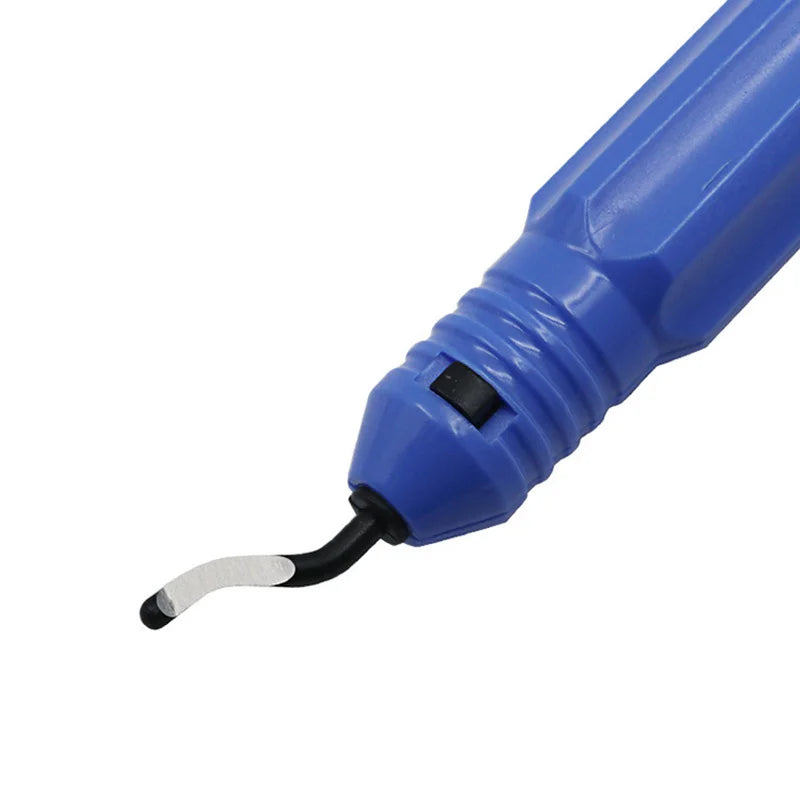


Description complète
Manual deburring kit: clean cut edges, without a file or craft knife
When you open a shell to fit an IPS screen, enlarge a screen window or rework a 3D-printed part, there's always a burr left on the cut edge. This manual deburring kit is made for exactly that: you run the blade along the edge and it removes the excess in one stroke. It's the finishing tool you're missing after the dremel and before reassembly.
What it does
- Rotating blades: the head swivels and follows the edge, straight or curved, without jamming in the corner.
- Plastic and metal: designed for plastic, aluminium, copper, steel and wood — so an ABS shell just as well as an aluminium plate.
- Metal handle: metal body, interchangeable blades, bit supplied for cleaning up the inside of a drilled hole.
What it doesn't do
- It isn't a cutting tool: it removes a burr, it doesn't make the screen window or open up a port.
- It doesn't sand or polish — for a perfectly smooth surface, you then need fine-grit sandpaper.
- No motor, no battery: it's an entirely manual tool.
- It isn't a toy and the blades are sharp: keep out of reach of children.
Compatibility
A generic workshop tool, independent of any console. It works on handheld console shells (Game Boy Advance, Game Boy Advance SP, Anbernic, Miyoo, TrimUI consoles), 3D prints, aluminium plates and cut circuit boards. It isn't designed for any particular model: it's the material that matters, not the device.
Skill level required
No soldering, no electronic disassembly. You get the hang of the tool in a few minutes: tilt the blade at 45° to the edge and pull it towards you, gently, in several passes rather than a single one. Have gloves and a low-angle light to see the burr. Exact kit contents and number of blades to be confirmed.
In the box
- 1 manual deburring tool with metal handle
- Interchangeable rotating deburring blades (quantity to be confirmed)
- 1 edge-finishing bit
- 1 storage pouch
Delivery in 10 to 18 days · ships within 3 to 5 days · 2-year legal guarantee of conformity · 14-day returns.
Read before ordering: Workshop & modding
Manual deburring kit — rotating blades for plastic and metal
The finishing tool that cleans up the cut edges of a shell or a printed part, without a file or craft knife.
En stock
📦Ships within 3 to 5 business days · Delivery in 10 to 18 business days · 2-year legal guarantee of conformity · 14-day returns.
ℹÀ partir de 150 €, la livraison s’effectue en Point Relais.
- 🇫🇷SAV français
réponse sous 1 jour ouvré - 🛡Garantie légale
2 ans - ↩14 jours
pour changer d’avis - 🔒Paiement sécurisé
CB · PayPal · Klarna
The task: the burr, last obstacle before reassembly
Enlarging a shell's screen window to take an IPS panel always leaves an uneven edge, bristling with plastic shavings. The same problem arises on a part fresh out of a 3D printer or on a sawn aluminium plate. As long as that burr is there, the shell won't close straight and the screen gasket won't sit flat. The deburrer runs along the edge, takes off the excess in one continuous shaving and leaves a clean chamfer.
The tool: a rotating head rather than a fixed blade
A craft knife blade slips and marks the plastic as soon as the edge turns. Here, the head swivels freely: it stays aligned with the edge even in an inside corner or on the curve of a shell. The handle is metal, the blades can be replaced when they go blunt, and a bit completes the kit for cleaning up the inside of a drilled hole. It's a manual tool with no motor: the speed comes from you, and so does the precision.
The limit: a finishing tool, not a cutting tool
We might as well say it before you buy: this tool comes in after the cut, never instead of it. It won't open a screen window or a USB-C port in a shell — for that you need a burr bit or a rotary tool. Nor does it replace sandpaper: for a perfectly smooth surface, you need to finish with a fine grit. The blades are sharp and the kit should be handled with gloves. The exact contents of the kit are still to be confirmed with the manufacturer.
What this accessory brings
Verified manufacturer specifications · vérifié le
Ce qu’il fait bien
- Rotating head that follows straight and curved edges
- Works on plastic, aluminium, copper, steel and wood
- Metal handle and interchangeable blades
- No power tool, no power supply
Ce qu’il ne fait pas
- Doesn't cut: it removes a burr, it doesn't open a screen window or a port
- Doesn't sand or polish: use fine-grit sandpaper afterwards
- Entirely manual tool, no motor
- Sharp blades, keep out of reach of children
- Exact number of blades in the kit to be confirmed
Voir toute la fiche technique+
Matière et format
- Type d’accessoire
- Deburring tool
Compatible avec
- Handheld console shells
- ABS plastic
- 3D prints
- Aluminium
- Copper
- Steel
- Wood
Dans la boîte
- 1 manual deburring tool with metal handle
- Interchangeable rotating deburring blades (quantity to be confirmed)
- 1 edge-finishing bit
- 1 storage pouch
Frequently Asked Questions
🔧 Do I need to solder or take anything apart to use it?
No. It's a hand tool, entirely mechanical: no soldering, no power supply, no electronic disassembly. You use it on a part that has already been removed, with the shell open.
🎮 Is it compatible with my console?
It's a generic workshop tool: it works the material, not a particular device. It suits handheld console shells (Game Boy Advance, Game Boy Advance SP, Anbernic, Miyoo, TrimUI), 3D prints, aluminium and steel.
✂️ Can it cut a screen window in a shell?
No. It removes the burr left by a cut that has already been made. To open a screen window or a port, you need a burr bit or a rotary tool; the deburrer comes in just afterwards, for finishing.
📦 What's in the box?
1 manual deburring tool with metal handle, interchangeable rotating blades, 1 edge-finishing bit and 1 storage pouch. The exact number of blades is still to be confirmed with the manufacturer.
🧰 What other tools do I need?
A pair of gloves, a low-angle light to see the burr and fine-grit sandpaper for finishing. A set of screwdrivers and an opening spudger are needed beforehand to open the shell.
⏱️ Is it hard to get the hang of?
No. Tilt the blade at about 45° to the edge and pull it towards you in several light passes rather than one heavy one. A few minutes of practice on a plastic offcut are enough before tackling a real shell.
🚚 What are the delivery times?
Delivery in 10 to 18 days, ships within 3 to 5 days.
🛡️ Which guarantee applies?
2-year legal guarantee of conformity. 14-day returns. French customer service, reply within 1 business day.
Why buy here rather than on a marketplace
It is a fair question. Here is the answer, straight.
Every listing is checked before publication: real compatibility, material, dimensions, box contents. Many models never make it into the catalogue.
A question about compatibility, a fit problem, a return: you write, a human replies within 1 business day. In French.
The 2-year legal warranty of conformity is handled by us — not by a form on the other side of the world. And 14 days to change your mind, with no need to justify yourself.
We do not claim to be the cheapest. We claim that you will know exactly what you are buying before you pay.
Read this before choosing
Our guides to accessories: compatibility, protection, transport.

Pixel art: create your own designs for a Divoom display
Grid size, number of colours, outlines, animation: the guide to getting started in pixel art and displaying your own creations on a Divoom display.
2 min de lecture · publié le

Divoom pixel art speakers: which one should you choose?
Astrotoo, Ditoo-Pro, FlowToo, Tiivoo-2, Timebox-Evo, MiniToo, Fairy-OK: the seven Divoom speakers compared, by use and budget.
2 min de lecture · publié le

Times Frame or Times Frame Pure: which Divoom floating photo frame should you choose?
64 or 32 GB, three colours or just one, a dial or not: the real differences between the Times Frame and Times Frame Pure…
1 min de lecture · publié le