
Description complète
Game Gear IPS screen kit: a sharp, bright and stable picture
The original Game Gear screen is dark, blurry and loses its colours over the years. This kit replaces the panel and its backlight with a 3.5-inch IPS V4 OGS screen at 320 × 240, with a high refresh rate and lower power consumption. It is the mod that makes a 1990 console genuinely playable today.
What it does
- 3.5-inch IPS panel, 320 × 240: wide viewing angles, stable colours and a readable picture across the whole surface, even at an angle.
- Single-chip and dual-chip motherboards: the driver board handles both families of Game Gear motherboards, according to the manufacturer.
- High refresh rate: fixes the screen tearing seen on previous generations of kits.
- Lower power consumption: less power-hungry than the original backlight, which helps battery life on AA batteries or a rechargeable battery.
- Pre-laminated version available: panel and glass lens already assembled at the factory, so no more dust or bubbles trapped between the two.
What it doesn't do
- It is neither a chip nor a circumvention device. The supplier's listing classifies the item as "Chip/Modchip": that is a catalogue error, it is a screen kit.
- It does not increase the resolution of games. The Game Gear outputs a 160 × 144 picture; the screen displays it larger and sharper, it does not add any detail.
- It does not replace a recap. Crackling sound, a shaking picture or a console that won't power on come from the capacitors, not the screen.
- It cannot be installed without tools: plan for a full teardown, wiring to the motherboard power supply and trimming of the front shell.
- No shell, console, soldering iron or tools included.
Compatibility
Designed for the Game Gear only, with single-chip and dual-chip motherboards according to the manufacturer. It does not fit any other machine: not the Game Boy, Game Boy Color, Lynx or Nomad. Motherboard revisions vary from one console to another — open yours and compare before ordering. Detailed compatibility by revision: to be confirmed.
Skill level required
Intermediate to advanced. You need to open the console, remove the original screen and its board, and wire up the power supply of the new driver board — so you must be able to solder cleanly on a 1990 board — then trim the opening of the front shell so the panel fits. You will need a Phillips screwdriver, a spudger, a fine-tip soldering iron and a file or rotary tool for the trimming. Allow one to two hours without rushing.
In the box
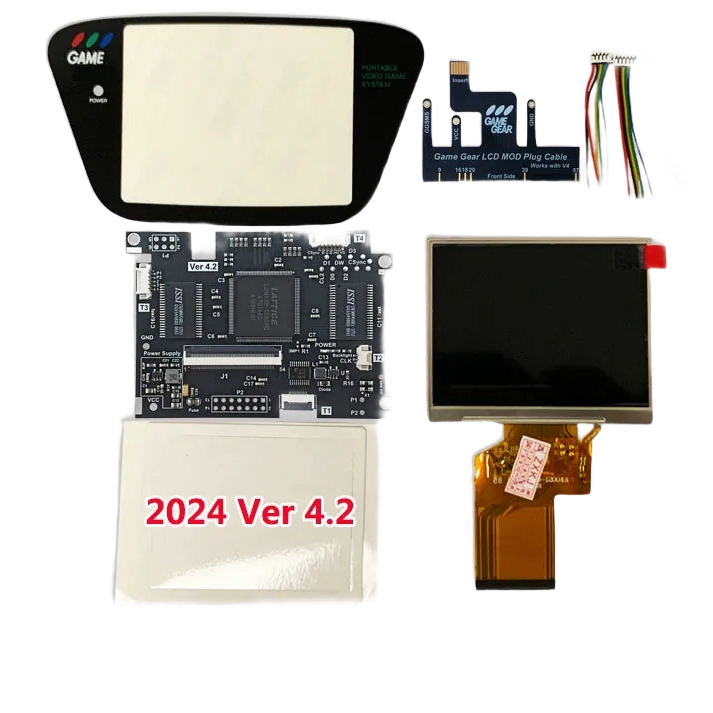
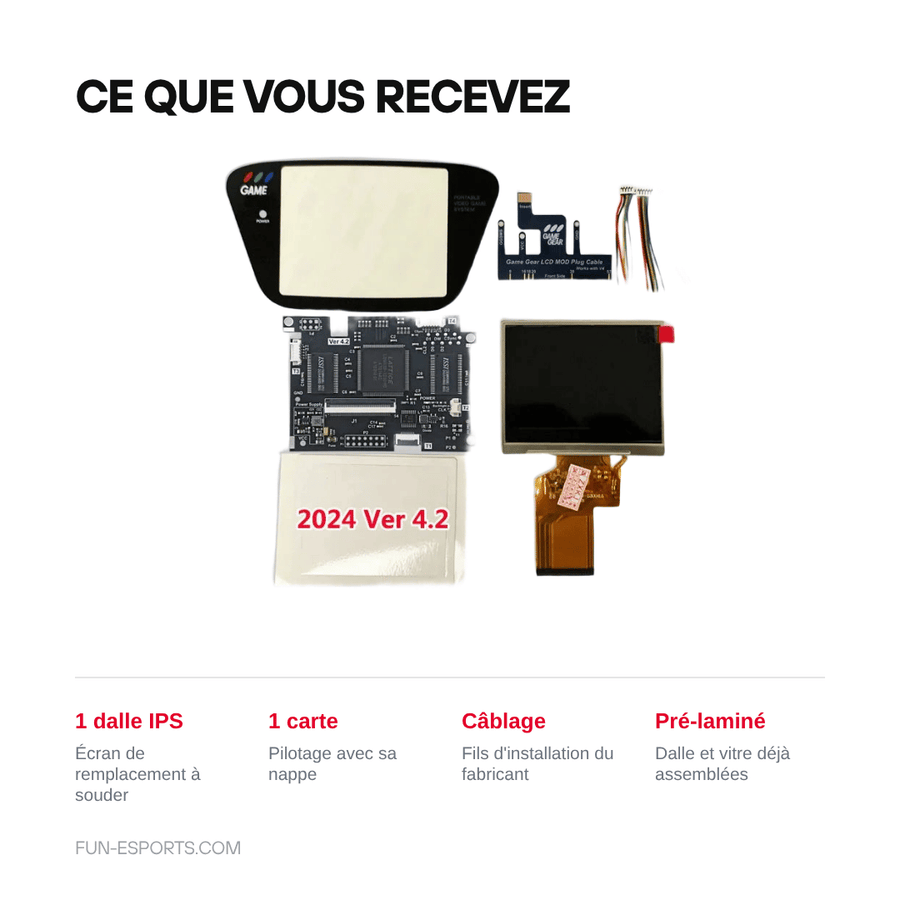
- 1 × 3.5-inch 320 × 240 IPS panel, pre-laminated or not depending on the chosen variant.
- 1 × driver board with its ribbon cable.
- The installation wiring supplied by the manufacturer — piece-by-piece details to be confirmed.
Read before ordering: Workshop & modding
Delivery in 10 to 18 days · ships within 3 to 5 days · 2-year legal guarantee · 14-day returns.
Game Gear IPS V4 OGS screen kit — 3.5-inch 320 × 240 panel
3.5-inch 320 × 240 IPS panel for Game Gear — sharp picture, modern backlight, soldered installation.
En stock
📦Ships within 3 to 5 business days · Delivery in 10 to 18 business days · 2-year legal guarantee · 14-day returns.
ℹÀ partir de 150 €, la livraison s’effectue en Point Relais.
- 🇫🇷SAV français
réponse sous 1 jour ouvré - 🛡Garantie légale
2 ans - ↩14 jours
pour changer d’avis - 🔒Paiement sécurisé
CB · PayPal · Klarna
The job: giving a 1990 console its screen back
A Game Gear pulled out of the attic shows a dark, milky picture, often edged with lines. The backlight tube has aged and the original STN panel was never made to last thirty-five years. This kit replaces the whole assembly: panel, backlight and driver board. Once fitted, the console regains a readable picture indoors and outdoors, with vivid colours and blacks that hold up.
The part: a V4 OGS, pre-laminated or bare
The V4 OGS generation fills the entire opening of the front panel and runs at 320 × 240, with a high refresh rate that fixes the screen tearing of older kits. The driver board accepts both single-chip and dual-chip motherboards. Two finishes: the pre-laminated version arrives with the glass already bonded to the panel — no more dust or bubbles during assembly — while the bare version leaves it to those who fit their own glass lens.
The limit: this is not a solder-free installation
We'll say it before you buy: this kit requires opening the console, soldering the driver board's power supply and trimming the front shell opening with a file or rotary tool. Allow one to two hours and a fine-tip iron. It fixes nothing but the display: crackling sound or a console that no longer powers on is down to the capacitors, not the screen. If you have never soldered, start with a tutorial before ordering.
What this accessory brings
Verified manufacturer specifications · vérifié le
Ce qu’il fait bien
- 3.5-inch IPS panel at 320 × 240
- High refresh rate, no screen tearing
- Compatible with single-chip and dual-chip motherboards
- Lower power consumption than the original backlight
- Pre-laminated variant: panel and glass already assembled
Ce qu’il ne fait pas
- Soldering on the motherboard required
- Front shell trimming needed
- Does not increase game resolution (160 × 144 native)
- Is no substitute for replacing the capacitors
- Console, shell and tools not included
Voir toute la fiche technique+
Matière et format
- Type d’accessoire
- IPS screen kit
Compatible avec
- Game Gear
- Game Gear single-chip motherboard
- Game Gear dual-chip motherboard
Dans la boîte
- 1 × 3.5-inch 320 × 240 IPS panel (pre-laminated depending on the variant)
- 1 × driver board with its ribbon cable
- Manufacturer's installation wiring — details to be checked
Frequently Asked Questions
🔧 Do I need to solder to install this kit?
Yes. The driver board has to be wired to the motherboard power supply: a few clean solder joints are enough, but a fine-tip iron and some experience are required.
🎮 Which consoles is it compatible with?
Only the Game Gear, with single-chip and dual-chip motherboards according to the manufacturer. It does not fit the Game Boy, Game Boy Color, Lynx or Nomad. Revisions vary: open your console and compare before ordering.
✂️ Do I need to modify the shell?
Yes, the opening of the front panel has to be trimmed so the 3.5-inch panel fits. A flat file or a rotary tool does the job; work in small passes.
📺 Will the games look more detailed?
No. The Game Gear outputs a 160 × 144 picture: the screen displays it larger, brighter and more stable, but it adds no detail to the game itself.
💡 What is the difference between the pre-laminated and the bare version?
The pre-laminated version arrives with the glass already bonded to the panel at the factory: no risk of trapped dust or bubbles. The bare version costs less and leaves fitting the glass up to you.
🧰 What tools do I need?
A Phillips screwdriver, a spudger, a fine-tip soldering iron with solder, and a file or rotary tool to trim the shell. Allow one to two hours for installation.
🚚 What are the delivery times?
Delivery in 10 to 18 days, ships within 3 to 5 days.
🛡️ What guarantee applies?
2-year legal guarantee of conformity. 14-day returns. Listing verified on 19 August 2026.
Why buy here rather than on a marketplace
It is a fair question. Here is the answer, straight.
Every listing is checked before publication: real compatibility, material, dimensions, box contents. Many models never make it into the catalogue.
A question about compatibility, a fit problem, a return: you write, a human replies within 1 business day. In French.
The 2-year legal warranty of conformity is handled by us — not by a form on the other side of the world. And 14 days to change your mind, with no need to justify yourself.
We do not claim to be the cheapest. We claim that you will know exactly what you are buying before you pay.
Read this before choosing
Our guides to accessories: compatibility, protection, transport.

Pixel art: create your own designs for a Divoom display
Grid size, number of colours, outlines, animation: the guide to getting started in pixel art and displaying your own creations on a Divoom display.
2 min de lecture · publié le

Divoom pixel art speakers: which one should you choose?
Astrotoo, Ditoo-Pro, FlowToo, Tiivoo-2, Timebox-Evo, MiniToo, Fairy-OK: the seven Divoom speakers compared, by use and budget.
2 min de lecture · publié le

Times Frame or Times Frame Pure: which Divoom floating photo frame should you choose?
64 or 32 GB, three colours or just one, a dial or not: the real differences between the Times Frame and Times Frame Pure…
1 min de lecture · publié le